

Action Scheduler for Crestron Home
Please Login / Register to view pricing.
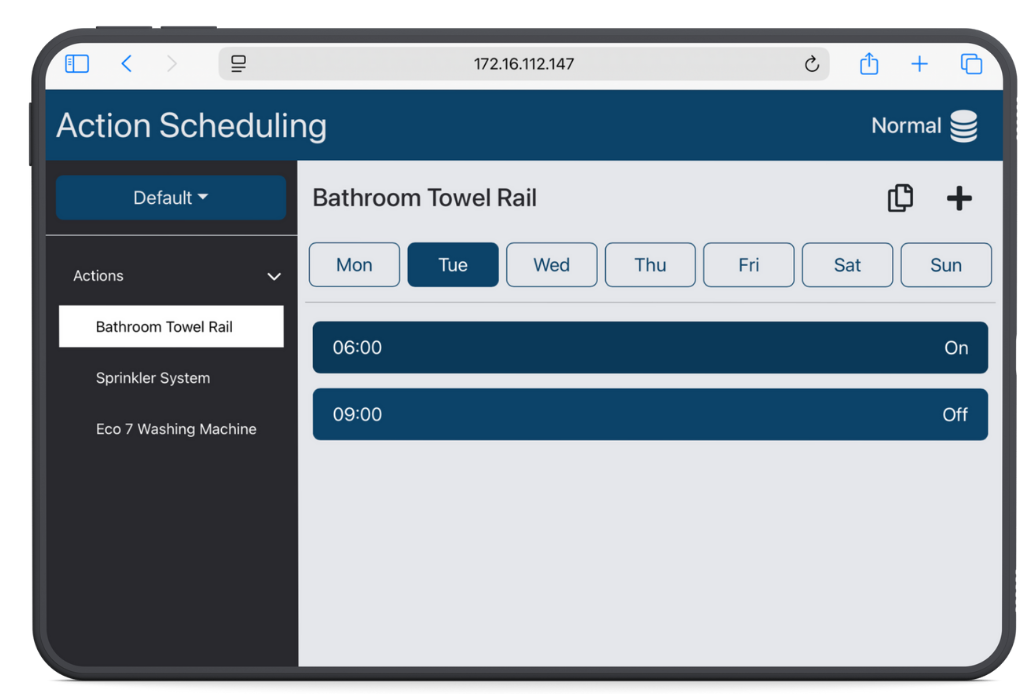
Simple in concept but rich in functionality, the Action Scheduler allows end users to easily set up on/off schedules for any device or system. At the heart of it is the Janus Scheduler Web App, which offers a familiar weekly calendar interface for planning events. But it goes further — with support for Profiles, users can save and instantly switch between entire sets of schedules. This makes it effortless to adapt the system for different situations, such as having guests over, seasonal changes, or unexpected warm spells — all without the hassle of manually editing each schedule.
From Janus Technology
New from Janus Technology, the Action Scheduler for Crestron Home brings powerful new scheduling capabilities to your smart home system — all with an intuitive and user-friendly interface.
Simple in concept but rich in functionality, the Action Scheduler allows end users to easily set up on/off schedules for any device or system. At the heart of it is the Janus Scheduler Web App, which offers a familiar weekly calendar interface for planning events. But it goes further — with support for Profiles, users can save and instantly switch between entire sets of schedules. This makes it effortless to adapt the system for different situations, such as having guests over, seasonal changes, or unexpected warm spells — all without the hassle of manually editing each schedule.
The Action Scheduler appears in Crestron Home as a UI Tile, fully configurable by the installer. Each tile can include multiple states, with custom text labels and icons chosen from a large library. Each state can be set to:

This flexibility enables the creation of a wide range of powerful UI Tiles, including:
- A simple On/Off toggle
- Timed Boosts (e.g. boost for 15 minutes, then turn off)
- Scheduled On/Off control
- Multi-state controls (e.g. Off, Schedule Enabled, Boost for 15 min, Boost for 1 hr, Permanently On)
Highly configurable and designed with both installers and end users in mind, the Action Scheduler makes it easier than ever to tailor Crestron Home to real-world lifestyles.

This driver features Janus Technology’s new cloud-based licensing system. After purchasing the driver and providing your Crestron Home processor’s MAC address, the driver will automatically license itself, eliminating the need for the installer to configure any licence settings in the Crestron Home setup.
The license activation may take up to one working day, but in the meantime, the driver will remain fully functional in Demo Mode.
The Crestron Home processor must have access to the internet.
This driver features Janus Technology’s new cloud-based licensing system. After purchasing the driver and providing your Crestron Home processor’s MAC address, the driver will automatically license itself, eliminating the need for the installer to configure any licence settings in the Crestron Home setup.
The license activation may take up to one working day, but in the meantime, the driver will remain fully functional in Demo Mode.
The Crestron Home processor must have access to the internet.






Reviews
There are no reviews yet.